Planning
A content calendar that shows the gaps
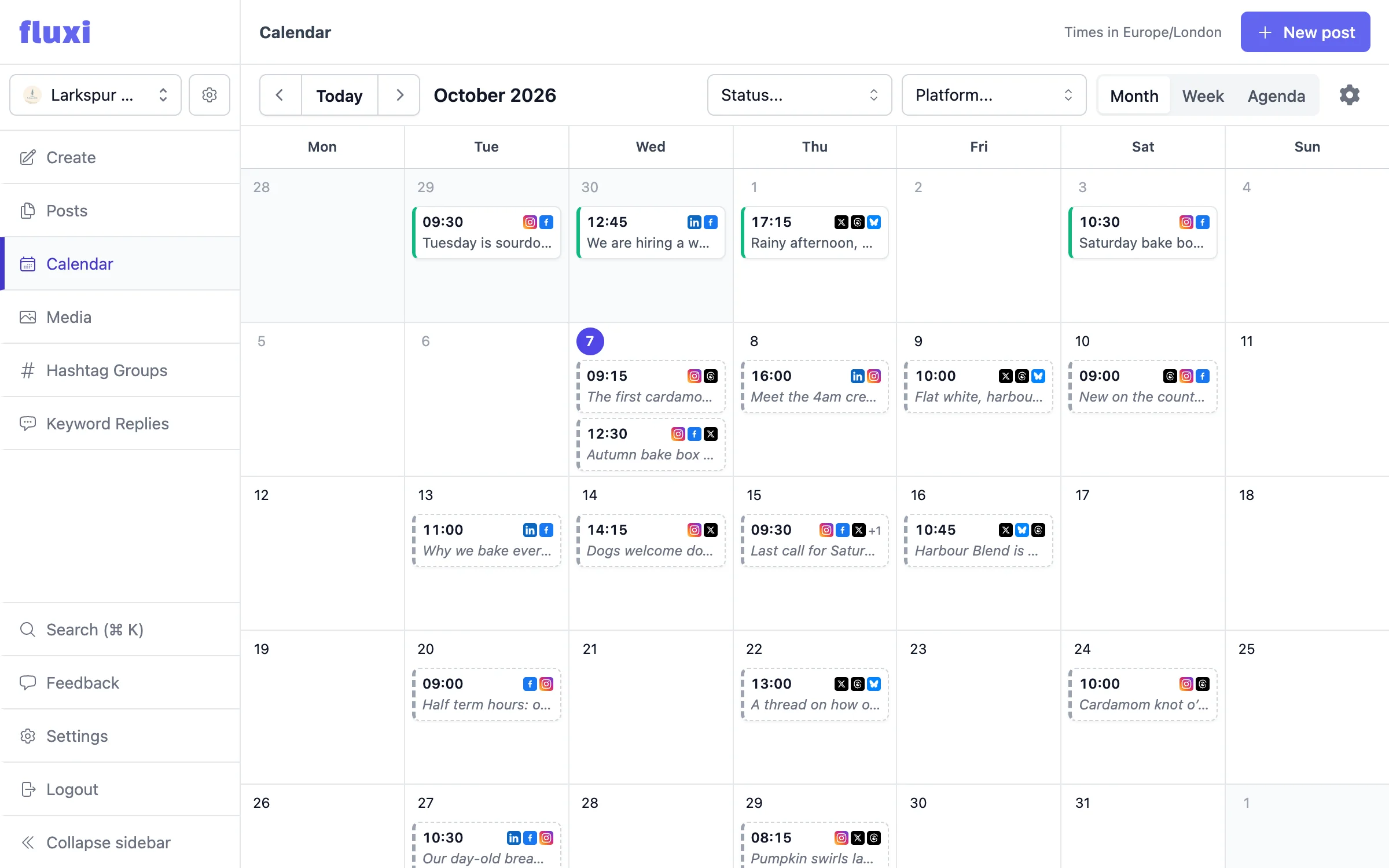
The calendar is the plan. Every post across every connected account, by month, by week or as an agenda, so you can see at a glance where the week is thin — and fill it before anyone asks why the feed went quiet.
The whole queue, one view
Every network, every account in the portfolio, on one grid. Filter to one network or one status when you need to.
Gaps are obvious
An empty Thursday looks empty — and offers to plan it with AI. That is the value of a calendar over a list.
Drag to reschedule
Move a post to another day, or another hour in the week view, by dragging it. Undo if you dropped it in the wrong place.
Per client, not per chaos
Each social portfolio has its own calendar, so one client’s campaign never visually collides with another’s.
Planning is a visual job
Anyone who has tried to plan a content month from a spreadsheet knows the problem: a list tells you what exists, but it does not tell you what is missing. Cadence — three posts a week, evenly spread, not three on Monday and nothing after — is a shape, and shapes are read at a glance or not at all. Fluxi’s calendar exists so that the shape of your month is the first thing you see.
Month, week and agenda
The month view shows the shape of the plan. The week view lays each day out by the hour, with the times that are typically good for your networks shaded, so you can see whether Tuesday’s three posts are spread through the day or stacked at nine. The agenda lists the days ahead, and is what opens on a phone.
- Filter by network, or by drafts, scheduled, needs attention or published
- Choose which day your week starts on
- The view and filters live in the address, so a link opens the same view for a teammate
One calendar per client
Fluxi scopes the calendar to the social portfolio you are working in. Switch portfolio in the sidebar and the calendar switches with it, showing only that client’s posts across their own connected accounts. If you run eight clients, you get eight clean calendars rather than one crowded one with a colour legend you have to memorise.
- Switch clients from the sidebar and the whole workspace follows
- Each portfolio’s calendar covers only its own connected accounts
- Media and hashtag groups are scoped the same way, so nothing crosses over
A working surface, not a report
A calendar you can only look at is a report. In Fluxi, clicking an empty day starts a post on it, and Plan with AI opens the composer with AI Assist ready to write. A scheduled post opens straight into the composer, where you can rewrite the copy, swap the image or change which networks it targets — or drag it to a new slot without opening it at all.
Planning around what has already gone out
Scheduled posts are only half the picture. The calendar also carries what has already published, which is what makes it useful for the retrospective half of the job — showing a client what ran last month, checking you have not repeated a theme two weeks running, or working out why a quiet fortnight happened. Click a published post to see how it went out on each network, with a link to the live post where the network gives one.
Built for people who cannot afford a surprise
If you manage social for other people, the worst moment in the job is discovering a gap after the client has. A calendar that covers every account they have given you, that is scoped to them alone, and that you can act on directly, turns that from a recurring embarrassment into a five-minute Monday habit.
Questions people ask
It shows one social portfolio at a time. Each client has their own calendar covering their own connected accounts, and you switch between them from the sidebar — which keeps a busy month readable rather than merging everything into one grid.
Yes. Drag it to another day, or to another time in the week view, and Fluxi moves it — with an undo if you change your mind. Click it to open it in the composer when you want to change more than the time.
Yes, alongside drafts and what is still queued — which is what makes it useful for showing a client what ran last month, not just what is coming.
Yes: month, week and agenda. The week view lays posts out by the hour and shades the times that are typically good for your networks.
The one you work in, so the time you see is the time the post goes out. You do not have to do UTC arithmetic to schedule something for nine on a Tuesday.
Get your next week scheduled
Connect an account, write a post and put it in the calendar. You can do all of it on the free trial, today.
14 days free. No card required.