Scheduling
Schedule a week of posts in an afternoon
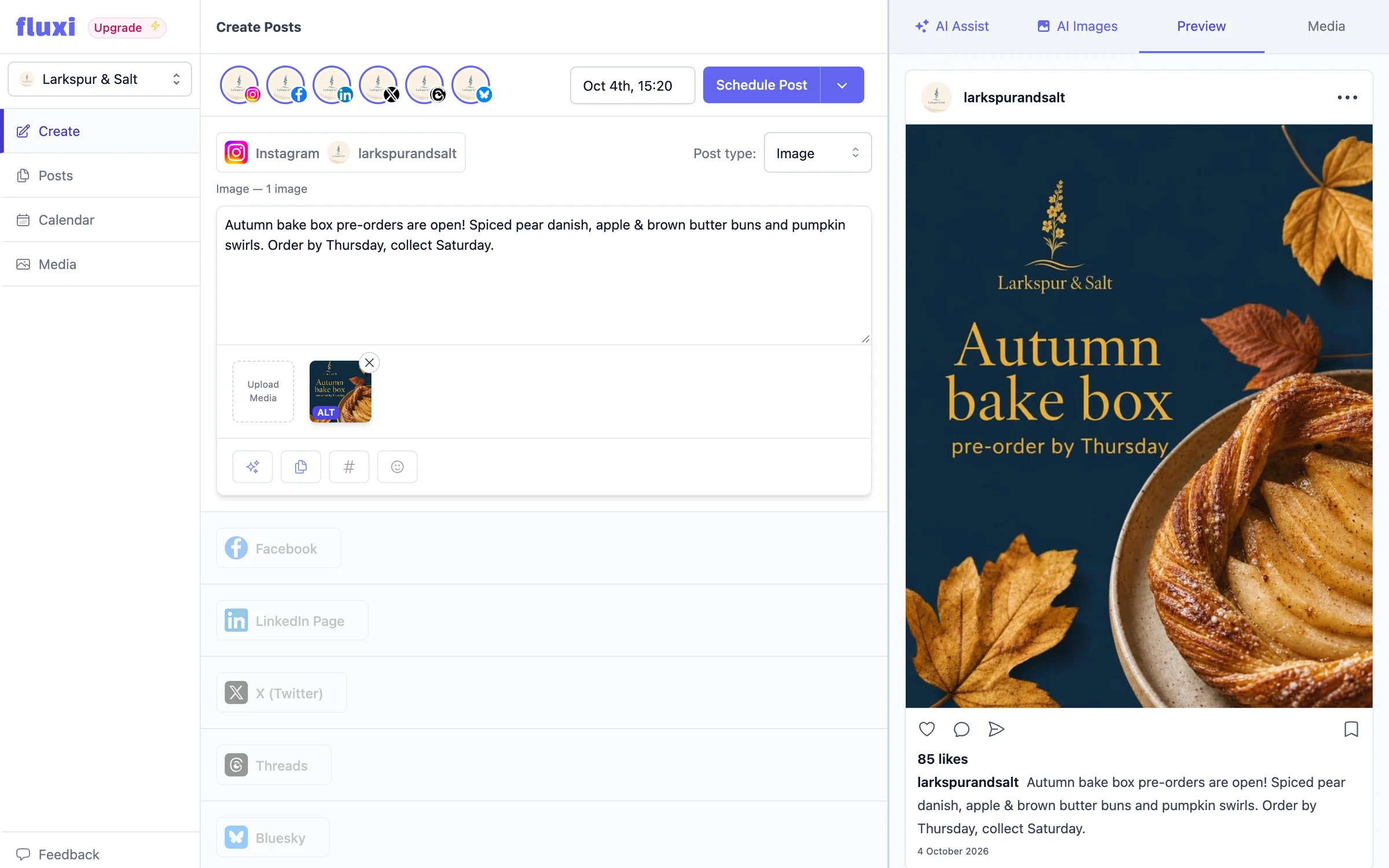
Fluxi’s composer puts every network you manage on one screen. Write the post, copy it across in one click, trim each network’s version to fit, check the preview, pick a time — and it goes out without you being at your desk.
Every network, one screen
Each selected account gets its own section in the same composer. Write it once, copy it to the rest in one click, then trim.
Per-network tailoring
The LinkedIn version can run long while the X version gets cut to the point, each checked against its own network’s limits.
Good times, suggested
One-click time suggestions for when your networks’ audiences are usually most active, worked out for where your audience lives.
Publishing that does not need you
Scheduled posts are published by Fluxi’s own workers. Close the laptop, go on holiday, the queue still runs.
Cross-posting without the copy-paste tax
The reason scheduling tools exist is that posting the same thing five times by hand is both boring and error-prone — you paste the wrong version, you forget the image on one network, you publish a 400-character thought to a platform that truncated it at 280. Fluxi’s composer keeps every network’s version side by side, so each one is written for its network and none of them gets forgotten.
- Select the accounts the post goes to, and each gets its own section
- Write it once and copy it to every other network in one click, then trim each to fit
- Change the copy, the media or the post type for one channel without touching the rest
- Character counts are shown per network, against that network’s real limit
- Or let AI Assist adapt the post for every other network for you
Choose the right post type for each network
Networks disagree about what a post even is. A YouTube upload is not an X thread, and an Instagram Reel is not a static feed image. Rather than flattening all of that into a lowest common denominator, Fluxi asks per channel — so a single scheduling session can produce a Reel, a LinkedIn text post and a TikTok video without three separate tools.
Check it before it goes out
Most scheduling mistakes are visual. An image that looked fine in the composer gets cropped into nonsense, or one network goes out with the wrong photo. Fluxi previews each network’s version with its media beside the composer — or from a Preview button on a phone or tablet — and checks each network’s media rules before you schedule, so the mistake surfaces while it is still cheap to fix.
Pick a time without guessing
Under the date picker, Fluxi suggests a few good times to post, one click each. They come from research into when audiences on your selected networks are usually most active, worked out for the time zones your audience lives in — so a client in Manchester with customers in New York gets New York’s mornings. Each one lands a few minutes off the hour, away from the rush of posts everyone else schedules for nine o’clock.
- Always a suggestion for today and for the day the post is set to
- A new post starts at the best time left today
- The calendar’s week view shades the good times, too
Scheduling, drafts and the queue
Not everything is ready to go out. Fluxi separates work in progress from work that is committed: drafts wait on the calendar until you are happy with them, and scheduled posts join the queue with a date and time attached. The queue is visible in the calendar and the posts timeline, so the question "what is going out this week" has one answer rather than five browser tabs.
- Save a draft at any point and come back to it — nothing is lost between sessions
- Schedule to the minute, in the time zone you work in
- Reschedule by dragging the post to another day or time on the calendar
- Failed posts say why in plain words, and a retry is one click
When something goes wrong, you are told what and where
Publishing to five APIs means five things that can fail independently. A post that went out on three networks and failed on two is marked partly published, not simply failed, and Fluxi shows what happened on each network in plain words. You get an email when a post fails, and Retry sends it again to the networks that missed it — without posting twice to the ones that did not. That matters at nine in the morning when a client asks why their LinkedIn is empty: you can answer, and fix it, in one look.
Keep it working after it goes out
Publishing is not the end of a post’s life. On X, Bluesky, Threads, Instagram and Facebook, the Automate button can repost it hours later for followers in other time zones, reply with a link once it takes off, or send a link to everyone who comments a keyword.
Questions people ask
Yes. Select the accounts you want, write the post, and copy it to every other network in one click. Each network keeps its own version, so you can trim one without changing the rest, and they all go out at the scheduled time.
No. Scheduled posts are published by Fluxi’s background workers, not by your browser. Once a post is in the queue it goes out whether or not you are signed in.
Yes, up until it publishes. Open it from the calendar or the posts timeline, change what you need and save, or drag it to a new slot on the calendar.
Yes. The composer suggests a few good times, based on research into when each network’s audience is usually most active and on where your audience lives. They are not worked out from your own posts’ results.
The post is marked failed, or partly published if some networks took it, with the reason in plain words for each network. Fluxi emails you, and one click retries just the networks that failed.
Get your next week scheduled
Connect an account, write a post and put it in the calendar. You can do all of it on the free trial, today.
14 days free. No card required.